

Finding the VLOOKUP settings page
Where to manage your VLOOKUP sources, account, and subscription in HubSpot.
Overview
Section titled “Overview”You manage everything in VLOOKUP — your sources, your account, and your subscription — from the VLOOKUP settings page. It opens from the app’s page in HubSpot’s settings.
-
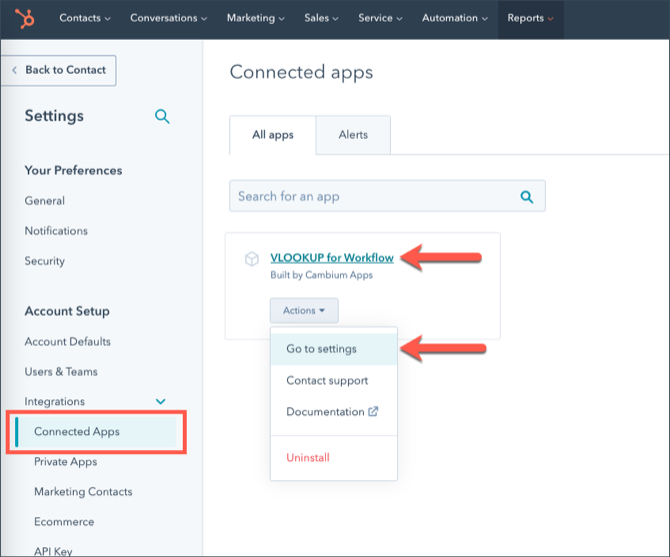
Open your connected apps. In HubSpot, go to Settings → Account Setup → Integrations → Connected Apps.
-
Find VLOOKUP for Workflow. Click its name, or choose Go to settings from its Actions menu.
-
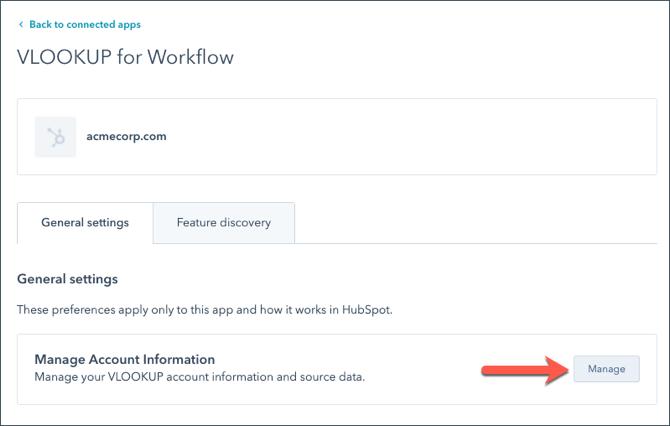
Click Manage in the Manage Account Information section.
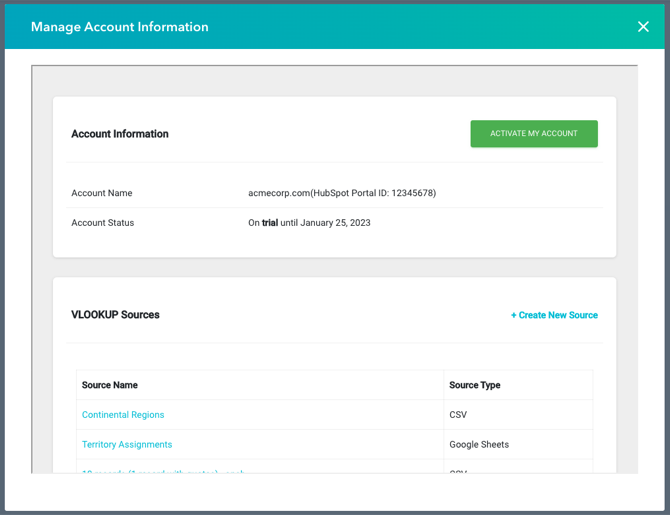
The VLOOKUP settings open in a pop-up window, where you can see your account status and create and edit your sources.
Related articles
Section titled “Related articles”Ask the help center
Answers come from these guides, with links to the articles used.
Ask anything about Transactional Email or VLOOKUP for Workflow.