

Subscribing to VLOOKUP
Activate your VLOOKUP account from the app's settings and check out with Stripe.
Overview
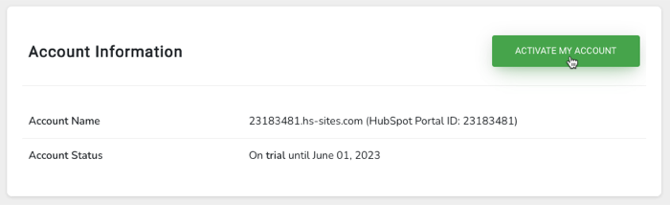
Section titled “Overview”You subscribe to VLOOKUP from inside the app. Whether your account is on its TRIAL or the trial has EXPIRED, the VLOOKUP settings show an ACTIVATE MY ACCOUNT button that takes you to a Stripe checkout.
-
Open the VLOOKUP settings. See Finding the VLOOKUP settings page.
-
Click ACTIVATE MY ACCOUNT.
-
Choose your options on the Stripe checkout page.
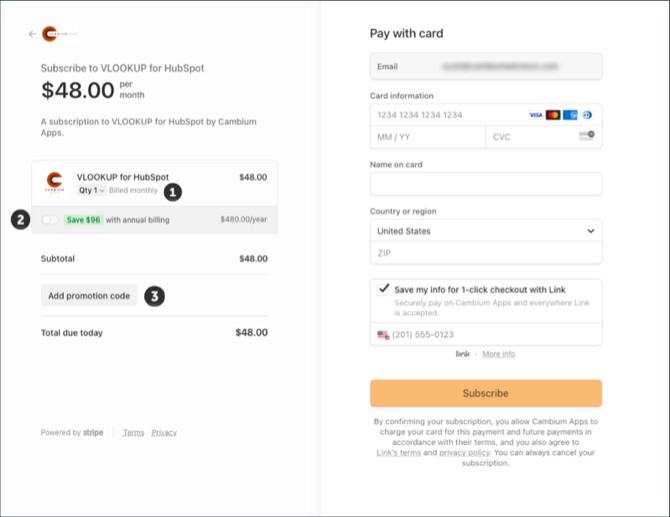
- Quantity — 1 by default. Each unit adds another set of usage limits: a quantity of 3 triples the daily and monthly limits.
- Annual billing — switch it on to save compared with paying monthly.
- Add promotion code — enter a code here if you were given one.
-
Enter your card details and click Subscribe.
Your subscription applies to your account immediately. Reopen the VLOOKUP settings and your account shows as ACTIVE.
Related articles
Section titled “Related articles”Ask the help center
Answers come from these guides, with links to the articles used.
Ask anything about Transactional Email or VLOOKUP for Workflow.