

Uninstalling VLOOKUP
Cancel your subscription, remove the action from your workflows, then uninstall the app.
Overview
Section titled “Overview”Uninstalling removes VLOOKUP from your HubSpot account completely, including every Perform a VLOOKUP action in your workflows.
Before you begin
Section titled “Before you begin”- Cancel your subscription first if you’re a paying customer, with Cancel Plan in Managing your VLOOKUP subscription.
- Remove the VLOOKUP actions from your workflows. Uninstalling deletes them, which can leave a workflow invalid.
-
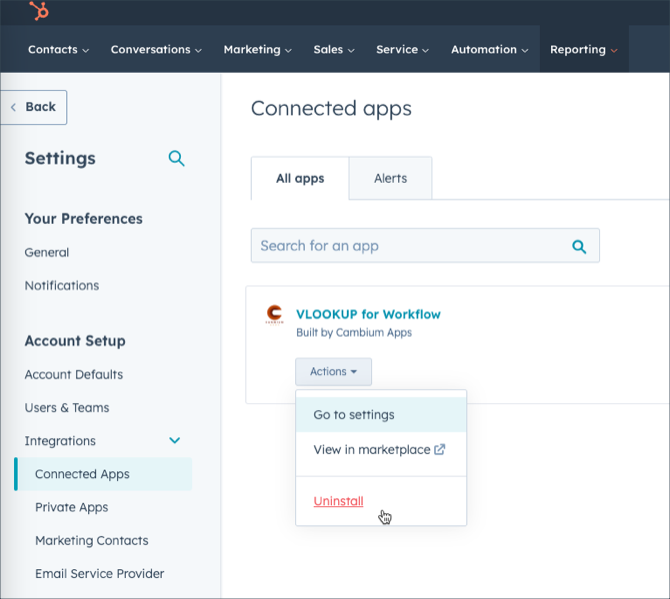
Open your connected apps. In HubSpot’s settings, go to Integrations → Connected Apps.
-
Find VLOOKUP for Workflow and choose Uninstall from its Actions menu.
-
Complete the confirmation dialog.
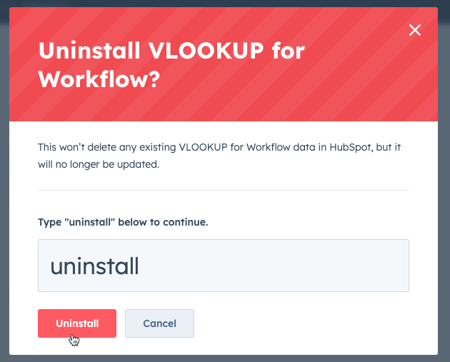
VLOOKUP is uninstalled, and its actions are gone from your workflows.
Related articles
Section titled “Related articles”Ask the help center
Answers come from these guides, with links to the articles used.
Ask anything about Transactional Email or VLOOKUP for Workflow.